Skip to content
nbilitygen
← VIDEO INSPIRATION

好莱坞科幻多分镜 10s(Volcano Engine 官方 timecode 范式)

Seedance · 创意实验 · 开源社区示例

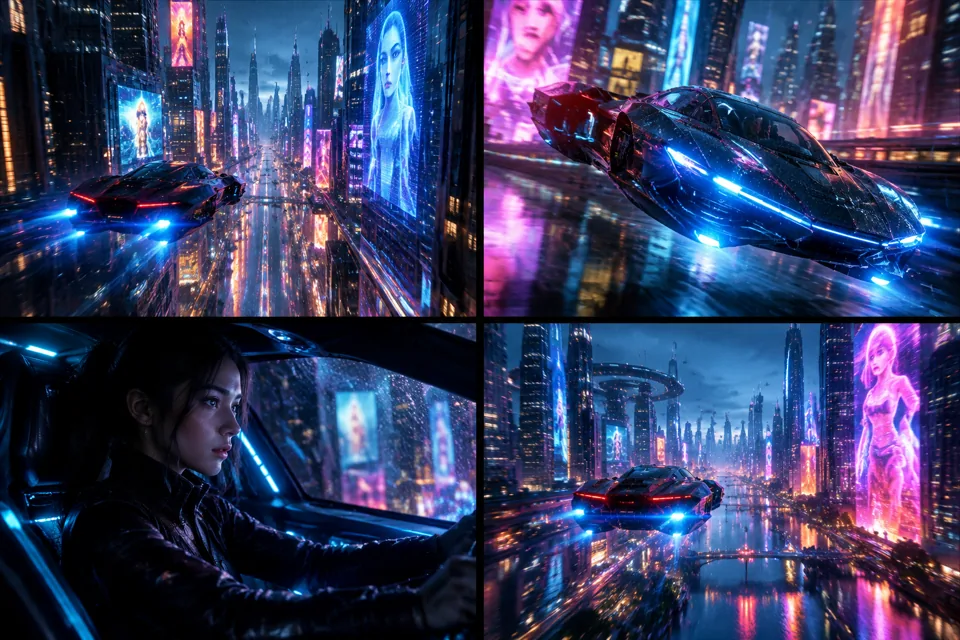
Storyboard preview for 好莱坞科幻多分镜 10s(Volcano Engine 官方 timecode 范式)STORYBOARD PREVIEW

A four-frame storyboard of the prompt’s visual direction. Actual video results depend on generation.

Model
seedance-2-720p
Duration
10s
Aspect ratio
21:9
Resolution
720p
Images
0
Media refs
— / —

Make the shot better依据 Volcano Engine 官方提示词指南 timecode 多分镜结构改写

What to look for本站尚未实测。检查主体一致性、运镜连续性与动作完整性;参考原始来源核对效果。

Community source · not tested on GenVolcano Engine - Seedance 2.0 prompt guide (timecode multi-shot template) ↗ · cclank/lanshu-awesome-ai-video-kit
MIT (repository)

The complete prompt v1

Create a 10-second cinematic sequence in a Hollywood sci-fi style with cyberpunk aesthetics, high-contrast neon lighting, and an epic score feel. Shot 1 (00:00-00:04) Wide tracking: a futuristic megacity canyon at night with falling rain. An anti-gravity vehicle weaves rapidly between skyscrapers. Countless holographic ads flash; neon reflections shimmer on glass curtain walls and the vehicle's surface. The vehicle leaves long blue light trails behind it. Shot 2 (00:04-00:07) Cockpit tight action: the vehicle drifts sharply to avoid an obstacle. Sparks and mist as the fuselage grazes a building edge. Rain hits the camera lens, blown away by high-speed airflow. Subtle camera shake emphasizes speed. Shot 3 (00:07-00:10) Epic pull-back crane: the vehicle bursts from the narrow buildings into an open city plaza. Reveal a panoramic megacity view as the vehicle flies through low clouds, with a massive lens flare streaking across the frame. Technical: 1080p, teal-and-orange cinematic grading, HDR, complex particle effects, realistic motion blur. Constraints: no watermark, no text, no Logo, no warped buildings.
Use this prompt

Original model: Seedance · seedance-2-720p
Original parameters: {"aspect": "21:9", "duration": "10s", "resolution": "1080p"}
A model category does not mean it is available on Gen. Check the studio for currently available models; review settings when adapting a prompt across models.

Reuse carries the prompt, model, duration, ratio and published references into the studio. Add any missing files and review the price before submitting.

Read the video guide