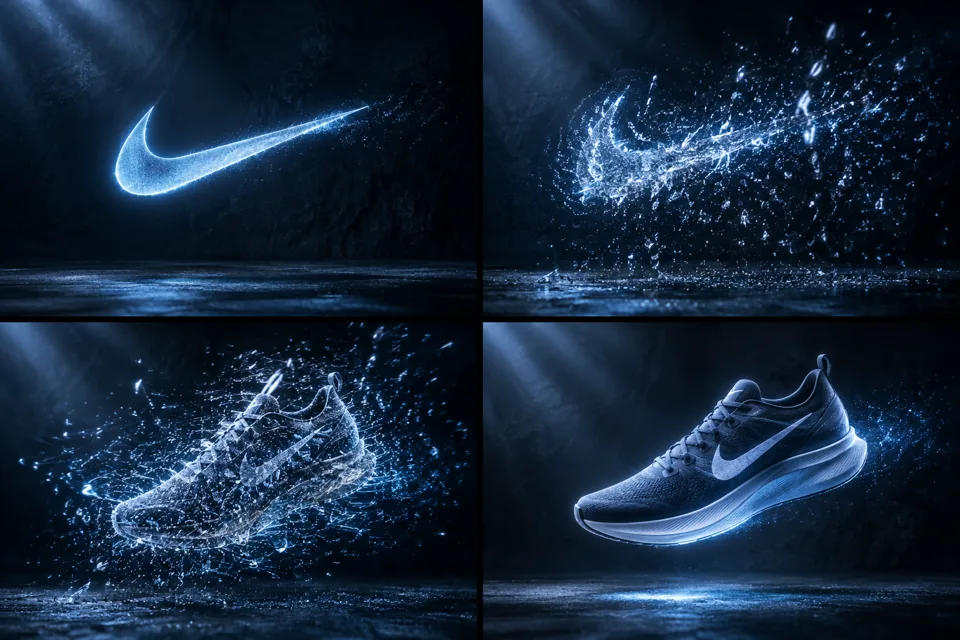
 STORYBOARD PREVIEW
A four-frame storyboard of the prompt’s visual direction. Actual video results depend on generation.
- Model
- veo-3
- Duration
- 5s
- Aspect ratio
- 16:9
- Resolution
- 720p
- Images
- 0
- Media refs
- — / —
Make the shot better保留原始提示词。先检查角色、素材引用与时长,按目标模型调整后再生成。
What to look for本站尚未实测。检查主体一致性、运镜连续性与动作完整性;参考原始来源核对效果。
Community source · not tested on Genliu-kaining ↗ · liu-kaining/Awesome-Veo3-Prompts
MIT (repository)
The complete prompt v1
{
"description": "Cinematic shot of a dark, textured backdrop illuminated by cool directional lighting. The Nike Swoosh hovers midair, glowing faintly. It begins to pulse with energy, then shatters into thousands of tiny particles. The particles swirl rapidly, gaining momentum, and begin to form a Nike running shoe midair—assembling piece by piece in a precise, fluid motion. Once fully formed, the shoe descends gently onto the surface and flexes subtly, as if infused with life. A single soft footstep echoes before the scene fades to black.",
"style": "cinematic",
"camera": "fixed wide angle",
"lighting": "moody, cool-toned with sharp directional contrast on a dark background",
"room": "abstract, textured studio backdrop with no discernible walls or environment",
"elements": [
"floating Nike Swoosh (glowing)",
"shattering particles (light-emitting, swirling)",
"Nike running shoe (sleek, modern)",
"surface with soft matte texture",
"subtle ambient particles or dust"
],
"motion": "Swoosh pulses and explodes into particles, which swirl and reform into a shoe; the shoe descends and flexes slightly",
"ending": "shoe lands gently, flexes with subtle energy, footstep is heard, then fade to black",
"text": "none",
"keywords": [
"16:9",
"Nike",
"brand reveal",
"particle animation",
"shoe assembly",
"cinematic",
"cool lighting",
"precision",
"energy"
]
}
Original model: Veo · veo-3
Original parameters: {}
A model category does not mean it is available on Gen. Check the studio for currently available models; review settings when adapting a prompt across models.
Reuse carries the prompt, model, duration, ratio and published references into the studio. Add any missing files and review the price before submitting.
Read the video guide